PhobGCC
Introduction
The PhobGCC, or Phob for short is a replacement motherboard for original Nintendo GameCube Controllers. While coming with a slew of features, its primary selling point is that it prevents stick drift, while having more accurate and responsive sticks. It also provides a built-in digital snapback filter which doesn’t have the downsides of traditional analog filters, while being completely customizable in software. For configuring, it even provides the ability to plug into a TV and customize everything in the built-in software.
No Stick Drift
You may have heard of stick drift before, which causes inputs to be delayed or move without you pushing the stick in a direction. This is especially common nowadays with the Nintendo Switch Joy-Cons, and the PS5 DualSense controllers. Stick drift is caused by the use of potentiometers to detect position of the stick, which work by sliding a wiper over a resistive element where the further down the resistive element it goes, the more the voltage is opposed and the lower the output. The issue with this, is that potentiometers are mechanical devices and will wear down over time causing their output to be less consistent.
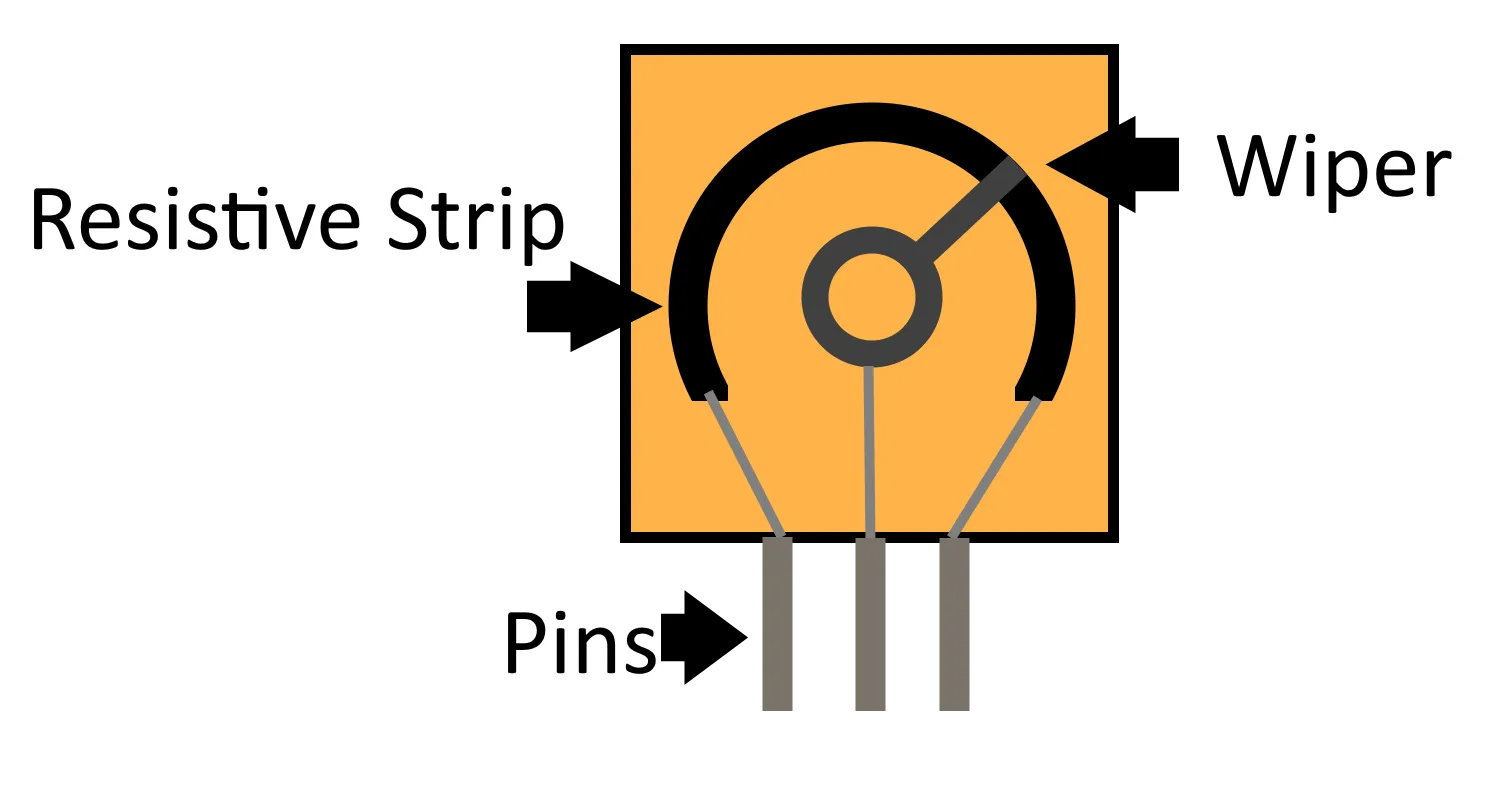 An example of what a potentiometer looks like inside.
Hall Effect Sensors
Since the issue with potentiometers is that they wear down due to contact, the solution that phobs use is to take away the contact entirely. They use a sensor called the Hall effect, in combination with magnets to detect the exact position of the stick without any part of the sensor rubbing while the stick is moving.
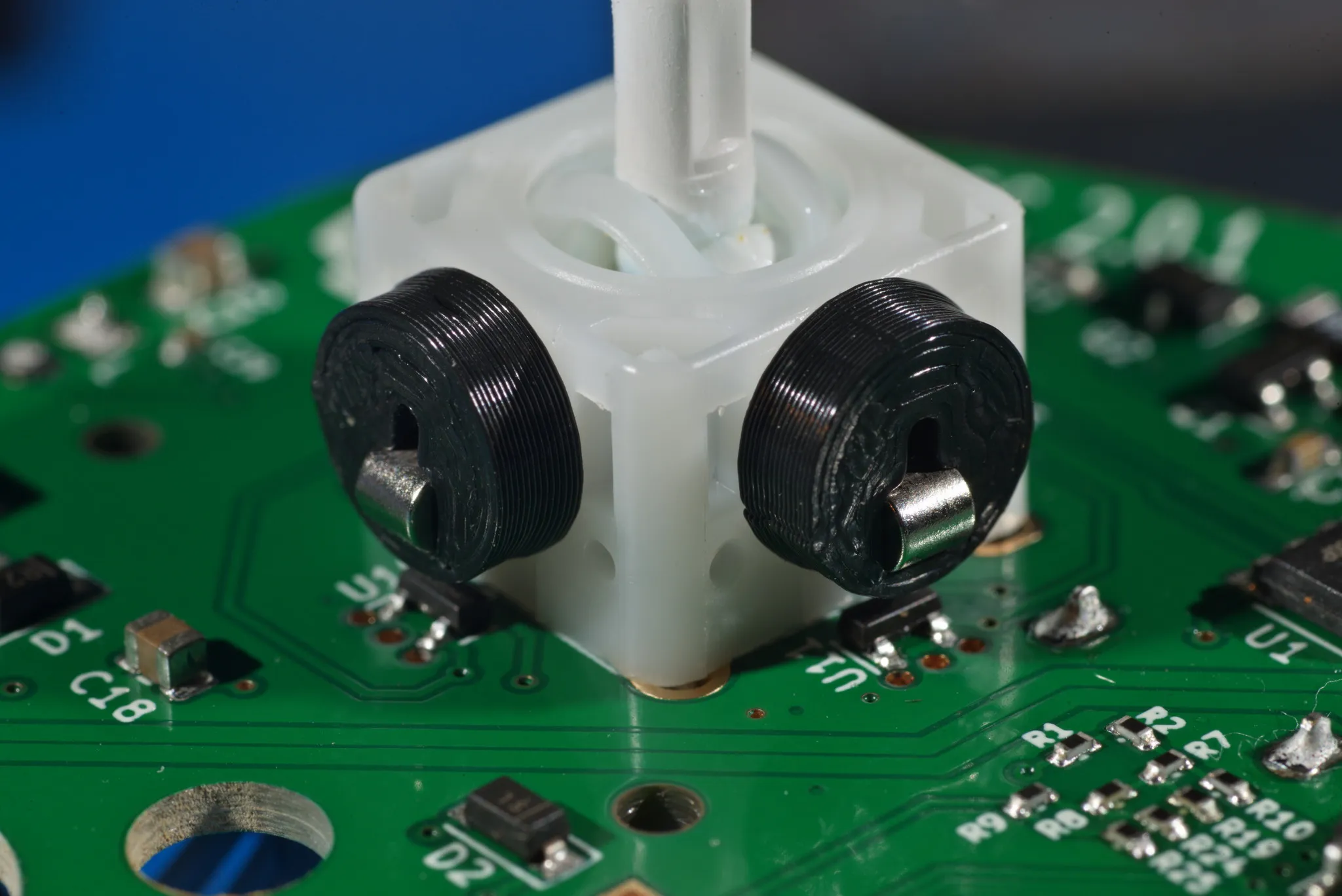 Source https://github.com/PhobGCC/PhobGCC-doc (licensed CC-by-SA)
The magnets are attached to the X and Y axis of the GameCube Controller’s stickbox, then sitting directly below that is the Hall effect sensor which reports the rotation of the magnet back to the board.
Notch Calibration
Another feature of the phob is the ability to completely calibrate where the stick is. This is done by going through the calibration process and pushing the stick in the notch that it’s supposed to go into. This can prevent a wide array of problems like gates wearing down, sticks wearing down, magnets moving over time or losing magnetization, amongst others. As well, this allows for custom notches to be calibrated to the correct value automatically and kept calibrated as they wear down.
For a guide on how to calibrate, you can find the official one here. Or if you do better with a video guide, I quite like this one.
https://www.youtube.com/watch?v=rkgtqwIE8Iw
PhobVision
PhobVision is a feature in 2.0 phobs which allows you to plug a controller directly into a TV to calibrate. All the software necessary is already built into the phob, so there’s nothing else needed but the TV and a port to plug the controller into. To see an example of what the looks like, there’s an outdated video demonstration made by developer CarVac here.
While PhobVision is very cool, there is little adaption of it amongst modders. To run video out from the controller, it requires drilling a hole into the controller which many think ruins the aesthetic of the controller. As well, since most of the configuration can be done through traditional software it doesn’t provide much value for your average user.
Differences between Phob 1.0 and 2.0
The 2.0 upgrade for phob brought a lot of internal changes, including support for PhobVision. Phob 1.0 had a few issues which get fixed in 2.0, including:
- 1.0 required you to use both USB cables of your adapter, due to running off the rumble power. 2.0 runs off the regular power line that Nintendo’s controllers do.
- 1.0 has disconnection issues on the Nintendo Switch after a firmware limited how much power controllers could draw, 2.0 does not have this issue and later revisions improved it even further.
- 1.0 phobs can work on the Switch if you disable rumble, as rumble is one of the larger power draws
- 1.0 phobs required a lot more work to assemble by the modder. 2.0 is much simpler and can mostly be assembled by a factory, which reduces the chances of mistakes
- 1.0 phobs are much more expensive, due to the cost of the microcontroller it uses
1.0 phobs still include most of the features that 2.0 has (besides PhobVision) so they are still a good option especially if you play mostly at a PC or on a GameCube/Wii. However due to them being more expensive than 2.0 to build, it is generally recommended to purchase a 2.0.
Conclusion
Some of the features I didn’t cover here are snapback filtering, wave shaping, and analog trigger modes. You can find how to configure those at the official guide here, which explains what each setting does and walks you through the steps. If you’re looking for more information or help with your phob, check out the Discord here.